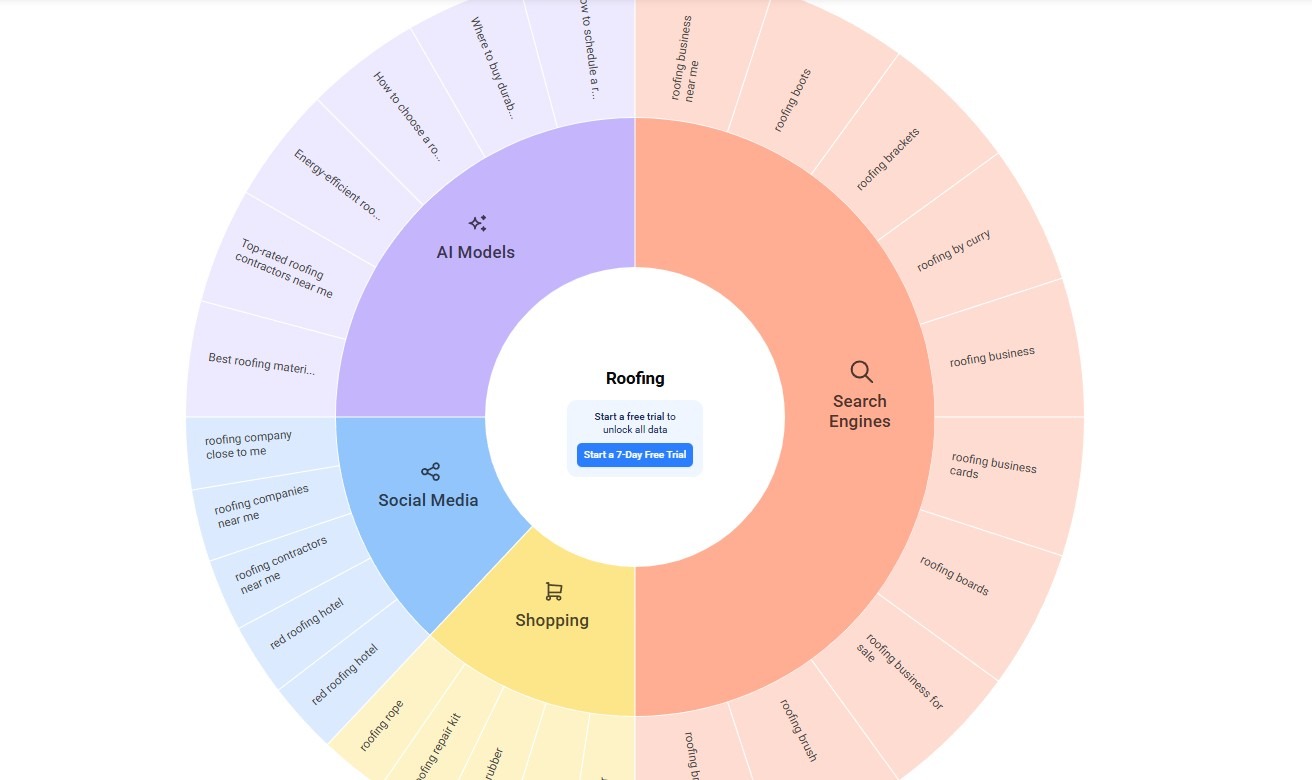
AnswerThePublic helps you uncover what people are actually searching for online by pulling real questions, comparisons, and phrases straight from Google’s autocomplete. Instead of guessing what might work, you get a clear view into your audience’s curiosity—and you can turn that insight into content ideas that feel timely, helpful, and genuinely relevant.
If you’ve ever stared at a blank screen wondering, “What should I write about next? ”—you’re not alone. Bloggers, marketers, founders, and content teams all struggle with one thing: coming up with fresh ideas that people truly care about. That’s exactly where AnswerThePublic shines.
It shows you real searches happening right now. Not assumptions. Not theories. Actual questions people are typing into Google every day.
In this guide, you’ll learn:
Let’s dive in and turn raw search data into content your audience actually wants to read.
AnswerThePublic is a search listening tool that uses autocomplete data from Google, Bing, YouTube, and other platforms to reveal the questions and phrases people are searching around a specific topic.
In simple words:
It shows you how people think when they search.
When someone starts typing a question like “Is coffee good for…”, Google tries to finish that sentence based on popular searches. AnswerThePublic collects those predictions and organizes them into an easy-to-understand structure.
Instead of guessing what your audience wants to know, you get a behind-the-scenes look at their real thoughts.


It’s like listening to hundreds of customer conversations at once—without running surveys or interviews.
AnswerThePublic doesn’t just give keywords. It shows you why people are searching—and that’s where the real value lies.
The bullet points you listed describe proven strategies that marketers employ using search query data—primarily from tools like Google Search Console (GSC)—to drive more organic traffic from search engines. Search query data reveals the exact phrases and questions people type into Google that lead (or could lead) to your site, including impressions (how often your site appears), clicks, click-through rates (CTR), and average positions.
This real-user data is gold for SEO because it shows actual search behavior, helping marketers create and optimize content that matches user intent. Below, I’ll explain each point in detail, with practical examples and why it works.
Overall, these tactics turn passive data into actionable SEO growth. Regularly reviewing GSC (e.g., monthly) helps prioritize efforts on high-potential queries, often leading to 20–100%+ traffic increases over time. Combine this with tools like “People Also Ask” boxes or AI (e.g., ChatGPT for brainstorming outlines) for even stronger results. If you’re implementing this for a specific site, starting with GSC’s top queries is the fastest win!
| Feature | What It Does | Why It’s Useful |
| Keyword Question Mapping | Shows real questions tied to a keyword | Perfect for long-tail SEO |
| Autocomplete Scraping | Pulls data from Google & Bing | Reveals true search intent |
| Visual Keyword Map | Groups keywords visually | Helps plan content clusters |
| Alphabetical Keywords | Lists ideas from A–Z | Great for topic expansion |
| Location & Language Filters | Country-specific searches | Ideal for local SEO |
| Keyword Comparison | Compare two topics | Spot rising trends |
| CSV Export | Download keyword lists | Easy team collaboration |
| Trend Tracking (Pro) | Tracks changes over time | Long-term planning |
| Alerts (Pro) | Notifies of new searches | Stay ahead of trends |
Unlike many SEO tools, AnswerThePublic doesn’t overwhelm you. It keeps things clean, visual, and human-focused.
The tool isn’t just a list generator—it’s visual and intuitive, which is perfect for SEO newbies who might get overwhelmed by data-heavy alternatives. Here’s what you’ll find:
Where does the data come from? It’s all from real-time autocomplete trends, so it reflects what’s buzzing now—seasonal stuff like “yoga for winter blues” in colder months.
Example in Action: Suppose you’re an e-commerce seller of kitchen gadgets. Input “blender” and see prepositions like “blender with ice crusher.” This could inspire a product page or video demo: “Our Top Blender with Ice Crusher: Perfect for Smoothies.” Suddenly, you’re matching what shoppers are typing, improving your chances of showing up in their results.
Don’t worry—using it is as simple as a Google search. Here’s a beginner-friendly walkthrough:
Pro tip for SEO starters: Run this every couple of weeks. Search trends shift, and fresh ideas keep your content relevant.
Example in Action: Let’s say you’re a newbie blogger on travel. Enter “budget travel to Europe.” You might find questions like “How to budget travel to Europe on $50 a day?” Use that to create a detailed guide with tips, itineraries, and photos. Optimize it with those exact phrases in headings (e.g., H2 tag: “Budget Travel to Europe Tips”), and watch your SEO rankings climb as Google sees it as helpful.
For SEO beginners, the magic is in turning data into action. This tool shifts you from generic content to intent-driven stuff that Google loves—because it satisfies users. Here’s how marketers use it:
The result? More organic traffic (free visitors from search) and better engagement, as people stick around for answers they crave.
In 2026’s fast-evolving search landscape—with AI reshaping queries—tools like this are essential. It democratizes SEO, helping you create “eerily relevant” content that drives traffic, engagement, and conversions. Free to start, scalable with Pro, and backed by real data from billions of searches.
Experiment today: Pick a niche keyword, generate ideas, and draft your first post. You’ll see results faster than with guesswork. SEO success starts with understanding your audience—and AnswerThePublic hands you the keys.
AnswerThePublic excels at visual, intent-focused ideation, but it’s not alone.
For pure inspiration, stick with AnswerThePublic; pair with others for comprehensive SEO.
Why Choose It? It’s less intimidating for newcomers, emphasizing creativity over data overload.
Answer The Public: The Secret Tool to Boost Your SEO Traffic
AnswerThePublic is used to discover real questions, phrases, and comparisons people are searching for online. It helps with content ideas, SEO planning, blog topics, FAQs, video scripts, and social media content.
It pulls data from search engine autocomplete suggestions, mainly from Google and Bing. These suggestions are based on real searches people are actively making.
Yes, there is a free version with limited daily searches. Paid plans unlock more searches, trend tracking, alerts, and saved reports.
No, it doesn’t show search volume directly. However, it integrates with Ubersuggest, which provides estimated search volume and CPC data.
Absolutely. The tool is very beginner-friendly and doesn’t require deep SEO knowledge. It focuses on understanding user questions rather than technical metrics.
Yes. It’s one of the best tools for blog ideation because it shows exactly what questions people want answered around a topic.
Yes. Many creators use it to find video titles, Shorts ideas, and script topics based on real audience questions.
Definitely. It helps uncover buyer questions that can improve product descriptions, FAQs, category pages, and comparison content.
Yes. You can target specific countries and languages, and you can also add city or location modifiers to discover local search queries.
Yes. It supports multiple languages and regions, making it useful for global and multilingual content strategies.
Using it every 2–4 weeks is ideal. This helps you spot new questions, trends, and seasonal changes in search behavior.
It’s a visual map that groups search queries into questions, comparisons, and phrases. It makes brainstorming and content clustering much easier.
Yes, but only on paid plans. The Pro version allows you to compare how search interest changes month over month.
It’s different, not better or worse. Traditional tools focus on numbers, while AnswerThePublic focuses on intent, questions, and real human language.
Yes. Paid plans allow team access, saved searches, and exports, making it useful for agencies and content teams.
Yes. The questions it provides are perfect for creating FAQ sections that match real user queries, improving chances of rich results.
Yes. You can use popular questions as email subject lines, newsletter topics, or lead magnet ideas.
Yes. It’s especially helpful for identifying beginner-level and problem-awareness questions that decision-makers search before buying.
Absolutely. You can use it to find missing questions and update old blog posts, making them more complete and SEO-friendly.
AnswerThePublic is ideal for bloggers, SEO professionals, marketers, founders, eCommerce brands, content creators, agencies, and anyone who creates content for search.
Elevate your online presence with Conversion Seed trusted Digital Matketing strategies and solutions.